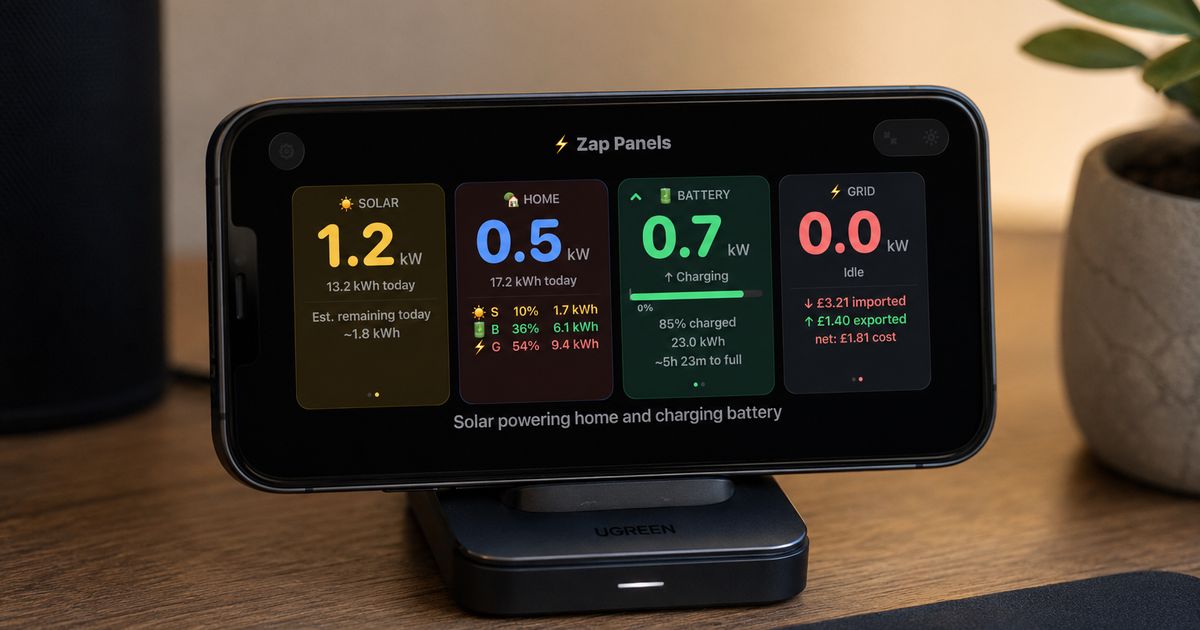
As the main instigator of the installation of a Tesla Powerwall 3 and DC Expansion Pack in our household, I’m very familiar with the value it brings when combined with our solar panels and an appropriate time of use tariff. I love to obsess over data I can get from the Powerwall and combining it with data from our energy supplier to conjure up all sorts of graphs and program automations to get the best from our system, but I am just one of four people at home and none of what I’ve just written about interests any of the other three!
My wife and children’s (very reasonable) primary concern is having a reliable supply of electricity which allows them to use the various electrical and electronic devices. We’ve had some success in load-shifting laundry and dishwashing to overnight off-peak periods, but what my family don’t have is any awareness about what our actual household electricity usage is like, what our solar panels or batteries are doing.
Whilst these are still things which may not interest my family, I wanted to make a simplified view available to them to inform and, ultimately, encourage behaviours which avoid importing peak-rate electricity.
I had the Tesla app and Netzero which both have their usefulness, but they’re not the most accessible in how they present information.
To tackle this, I dusted off a 2021 Samsung Galaxy A7 Lite tablet which had long been forgotten about, plugged it into a USB charger, installed the Zap Panels app onto it and left it displayed prominently in the kitchen.
About Zap Panels
Zap Panels is an Android and iOS app which provides a whole heap of information about a home’s energy flow. It surfaces information from a Tesla Powerwall via a user’s Tesla account which includes solar generation, household demand, battery status, and grid interaction all into a single view.
What the Zap Panels offers
Zap Panels centres around a single dashboard view consisting of 4 separate “panels”. Each panel houses an area of electrical interest.
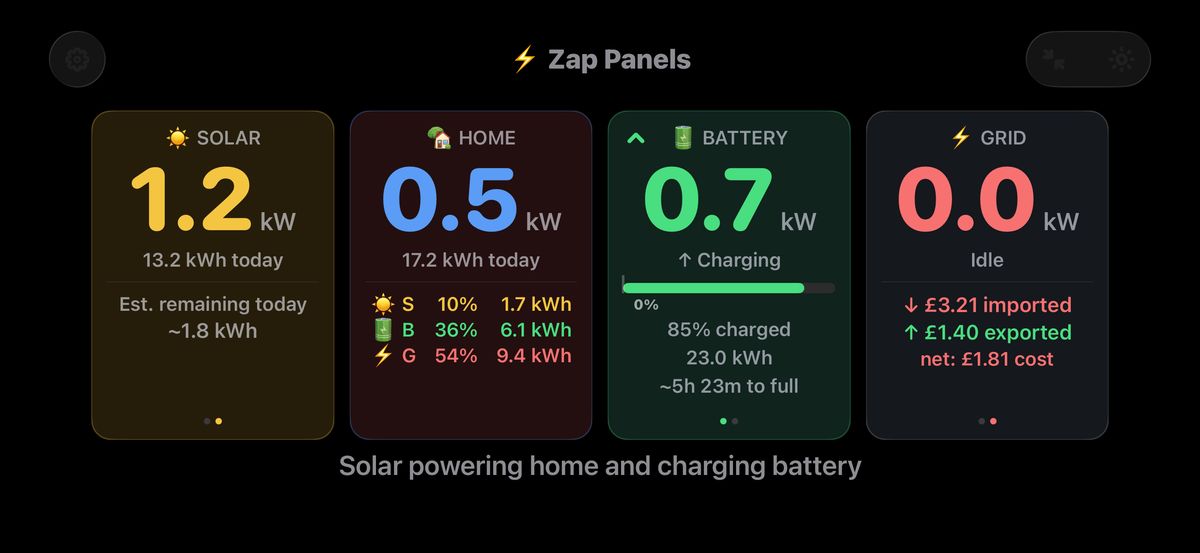
Solar:
- live solar generation from our panels (kW)
- total generation for today (kWh)
- local weather forecast for remaining daylight hours or next day
- estimated remaining solar generation today or next day if after sunset (kWh)
Home:
- current household demand in (kW)
- total electricity consumption for the day (kWh)
- breakdown of how the consumption was met across solar, battery, grid (% and kWh)
Battery:
- live battery charge/discharge rate (kW)
- remaining state of charge (% and kWh)
- length of time the battery will power the home at the current discharge rate or until it’s full if charging
Grid:
- live import or export rate (kW)
- total import, export kWh for the day, and the net total
- total import, export cost for the day, and the net total
- Octopus Agile pricing
- Intelligent Octopus Go dispatch slots
This is a lot of data to show in a single dashboard view so some of the panels feature a carousel which shows different cards with the data spread across them. The carousel can be configured to automatically advance like a slide show or you can tap on each panel to advance manually. This is an elegant way to display the same amount of information no matter whether the device is an iPhone, an Android device, an iPad Mini, or near 13-inch iPad Pro!
At the bottom of the screen is a plain-English description of what the system is doing. This is similar to the feature which Tesla recently implemented in their own app, but without the need to tap on the screen to see it.
Setting up the app
To feed the 4 panels with data, set-up involves signing into the Tesla account associated with the Powerwall. The app then polls Tesla regularly to obtain real-time reading of solar generation, battery state, household demand, and grid interaction.
As the Tesla app is aware of my import and export tariff structure, there’s also an option to import this from Tesla for use in Zap Panels which in turn can be used for the running daily cost calculation.
In addition to live data from Tesla, you can also input your location to show a local weather forecast and estimation of how many kWh your system is likely to generate for the given conditions.
If you’re on the Intelligent Octopus Go tariffs then there’s additional set-up to connect your account to the app to show your charging slots and current pricing. If you’re on the Octopus Agile tariff then you can enable the display of current and upcoming slot prices.
Customising the display
There are a multitude of display options so you can tailor the app to your taste:
- Light and dark modes
- “Full screen” or distraction-free view
- Frequency at which the live readings are updated (15 - 60s)
- Carousel auto-advance period
- Various font sizes
- Prevent the display from going to sleep
- Higher contrast text option
- Reorder the panels with drag and drop
Zap Panels Benefits
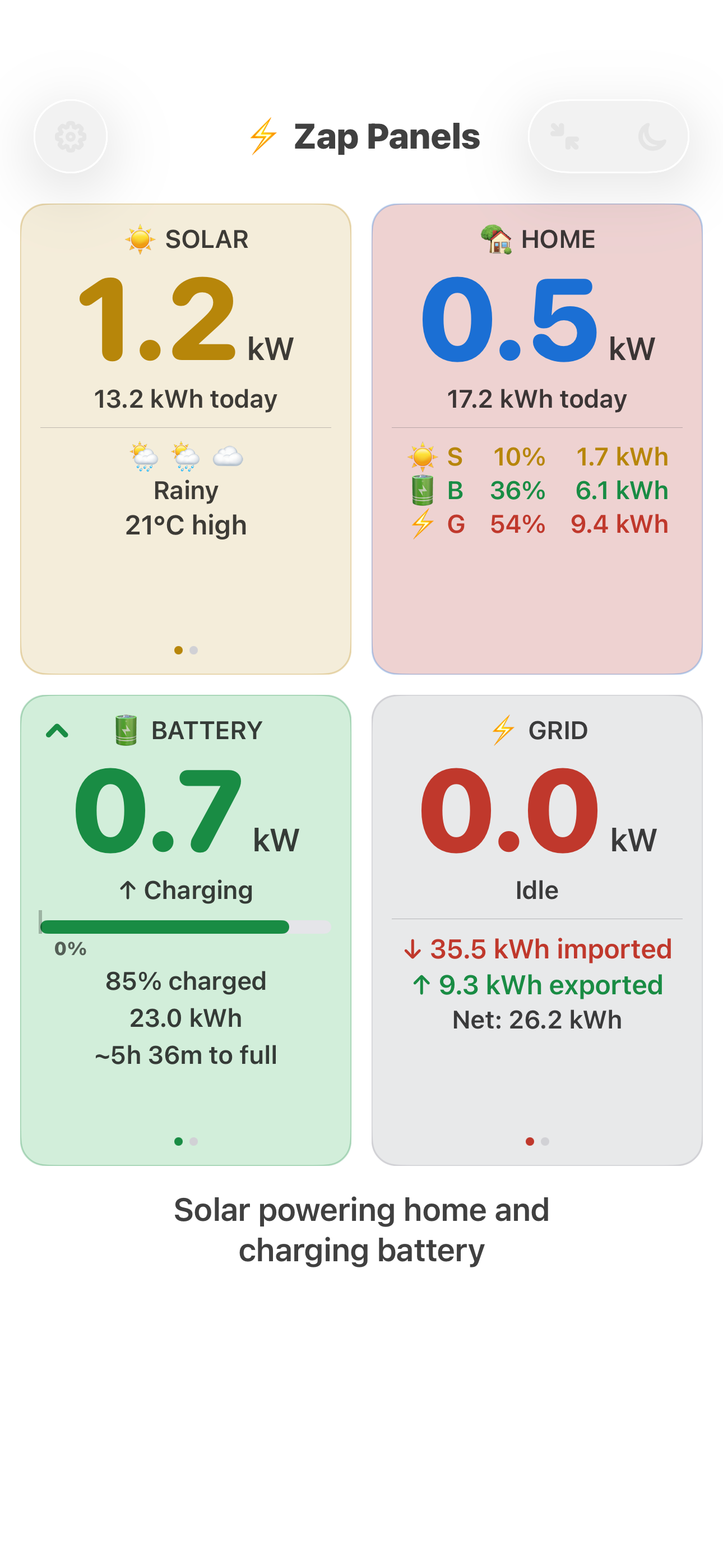
The app shows the total amount electricity we import each day, a concept too abstract for my wife and kids, but now they can see how we can convert sunlight into money to either reduce how much we import or offset the cost with the money we get back from exporting to the grid.
As Zap Panels is read-only, there’s no chance any of the settings I’ve worked hard to fine tune and automate might get accidentally changed when the device it’s on is left unlocked with the dashboard displayed.
For everyone else at home, the most pertinent information is displayed clearly. For me, I get everything I want to satisfy my thirst for data at a glance. The only thing that’s missing is a historical view, but I can forgive that since the app is very much focused on being a live display for the day.
For historical analysis, I have other sources to get the data I want. Zap Panels is not the one app to rule them all. You can’t change any Powerwall settings with it, but then that’s reflected in its cost, which is free for the most part. I’d imagine that most users will be happy with what the app provides without having to make a purchase.
In this age of subscription apps, it’s refreshing to see that the core functionality is available completely free of charge and a modest one-time in-app purchase (£4.99 at the time of writing) permanently unlocks the “premium” features:
- Real-time daily import cost, export earnings, net cost.
- Display Octopus Agile rates
- Display Intelligent Octopus Go (IOG) dispatch slots
Although the app can display import costs, if you enable the display of Agile rates or IOG slots then the import and net cost figures are dropped from the cards. This is because the app needs additional integration with an Octopus account and/or EV charger, otherwise the figures could be inaccurate. Hopefully this is something that gets added in a future update.
Repurposing Abandoned Devices
If you’re a tech hoarder like me then you’ve probably got an old mobile phone or tablet lying about unused in a drawer.
My Samsung Galaxy A7 Lite tablet is slow as hell to use for even basic tasks, but it’s an ideal candidate for leaving Zap Panels permanently active on it. It consumes very little power, but has a good-sized, bright and clear display which makes it ideal as an in-home display. A couple of adhesive hook and loop pads is plenty enough to mount it onto a wall.
I also have a couple of 8-inch Amazon Fire tablets that the kids don’t use any more since they upgraded to newer versions. If I wanted additional displays around the house then I could resurrect those too.
I’ve also installed Zap Panels onto my daily carry iPhone 15 Pro Max to replace the Tesla app and Netzero as my go-to dashboard. I still use those two apps for making config changes, but I much prefer the Zap Panels user interface with everything at a glance.
Conclusion
Zap Panels isn’t going to replace the Tesla app, but as a free alternative dashboard which allows you to bring discarded devices back to usefulness with a view of your home energy system on a single pane of glass, it’s hard to dismiss.
I really like the clean look of the user interface and that I can customise the font sizes to suit my middle-aged eyesight for viewing at a distance!
For a free app with no advertising that I can see, it’s hard not to like it, but I wanted to see the running cost total and IOG dispatch slots so paid for the additional features.
Install Zap Panels and Find Out More
The app is free to download:
For more details, the app’s website can be found at zappanels.com.